Free chart walkthrough · No signup needed
Read the chart. Build your plan.
Explore trend context, the stop and two targets on a real Darth Algo example.
Read one chart, step by step.
Recorded product example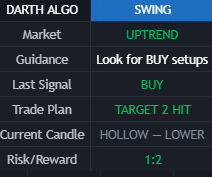
Read the context
Direction comes before a signal.
The dashboard summarizes the market environment. In this recorded example it shows an uptrend and BUY guidance. Compare that context with the chart before interpreting a marker.
This dashboard was captured after the move. Its completed target is not information you would have had before entering.
Keep this checklist
Before you consider a setup.
Use this process on another chart. Clear levels help organize a decision; they do not remove trading risk.
- 1. Context: identify direction, timeframe, and whether the market is trending or choppy.
- 2. Invalidation: identify the stop area and evaluate position size and potential loss.
- 3. Targets: compare possible exits with downside, execution costs, and your own plan.
Keep learning together
Bring your questions to the community.
Explore the free Darth Algo Telegram community for chart discussions, short lessons, and TradingView setup help.
Want to try the tool?
Swing offers a two-day trial, then $14.99/month unless canceled. The trial starts at checkout. TradingView access is granted automatically after checkout using your exact username.
Review the Swing trialAlready have access?
- Open your TradingView chart.
- Open Indicators, then Invite-only scripts.
- Add your Darth Algo tool and review its settings.
Educational product demonstration only, not financial advice. Trading involves risk. Selected historical screenshots do not establish typical results or future performance.